
AI & Automation
AI Agent Config in 2026: What Belongs in AGENTS.md, Skills, and CLAUDE.md
Three config files, three lifecycles. Learn what belongs in AGENTS.md, when to use SKILL.md workflows, and how CLAUDE.md fits—without duplicating rules across tools.
Need AI integrated into your ERP, website, WhatsApp, CRM or internal systems?
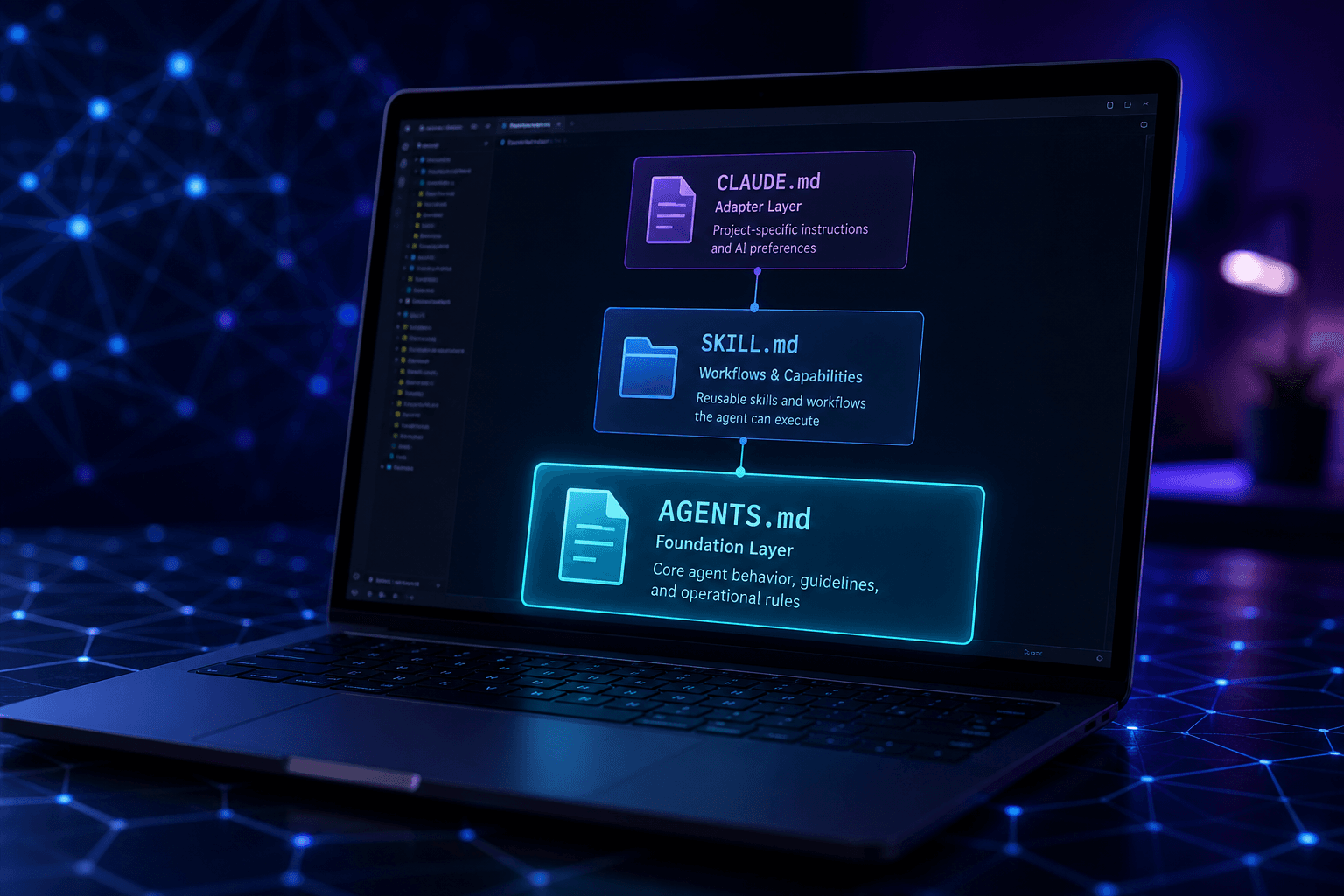
If you have opened a repo in Cursor, Claude Code, or Copilot in 2026, you have probably seen at least one of these filenames: AGENTS.md, CLAUDE.md, or SKILL.md. They all tell an AI how to behave—but they do not own the same job. Teams that treat them as interchangeable copies end up with bloated context, conflicting instructions, and agents that ignore half the rules.
This guide maps what each file owns, how they stack together, and the setup Capricon recommends for teams shipping with vibe-coded prototypes, custom ERP modules, or vibe-coded app maintenance handoffs—without maintaining four versions of the same coding standard.
The 2026 mental model: layers, not competitors
Think in layers. AGENTS.md is the shared project brief. SKILL.md packages are on-demand playbooks. CLAUDE.md is Claude Code’s thin adapter. Cursor’s .cursor/rules/*.mdc files handle tool-specific scoping. None of these replaced the others—they split responsibilities so context stays lean.
- AGENTS.md → always-on project truth (portable across tools).
- SKILL.md → load when the task matches (workflows, scripts, templates).
- CLAUDE.md → Claude-only adapter (imports AGENTS.md + Claude settings).
- .cursor/rules/*.mdc → Cursor-only scoping (globs, alwaysApply).
AGENTS.md: what belongs here
AGENTS.md is the emerging open standard for repository-level agent context. Cursor, Claude Code, OpenAI Codex, Aider, Zed, and a growing list of tools read it from the repo root. It is version-controlled, reviewable in pull requests, and portable when your team uses more than one agent.
Put information every contributor—and every agent—needs on every task:
- What the product does and who uses it.
- Repo layout: apps/, packages/, where APIs and frontends live.
- Build, test, and deploy commands (exact scripts, not “run the tests”).
- Coding conventions: naming, error handling, preferred libraries.
- Security and compliance boundaries (PDPA, PCI, healthcare data).
- How to run migrations, seed data, or connect to staging.
Do not put long deployment runbooks or “how to review a PR” procedures here. Those belong in skills so they load only when relevant. Capricon keeps AGENTS.md under roughly two pages; if it grows past that, split detail into skills or linked docs.
SKILL.md: workflows that load on demand
Skills are directories with a SKILL.md file and optional scripts/, references/, and assets/. Cursor discovers them from .cursor/skills/, .agents/skills/, and compatible paths such as .claude/skills/. The Agent Skills format is an open standard—skills can travel across agents that support it.
Each SKILL.md has YAML frontmatter with name and description. The description is critical: the agent uses it to decide when to load the skill. Use the paths field (or nest skills under a monorepo package) to scope file-specific guidance without polluting every session.
- Deploy-to-staging with validation scripts.
- PR review checklist for your security and style rules.
- Database migration workflow with rollback steps.
- SEO audit or schema markup for marketing sites.
- Commit message format and release tagging.
- Vendor-specific integrations (WordPress MCP, PayHere webhooks).
Set disable-model-invocation: true when a skill should run only via /skill-name—useful for dangerous or expensive operations. Default skills load when context matches; explicit skills behave like slash commands.
CLAUDE.md: Claude Code’s adapter, not a second AGENTS.md
CLAUDE.md is Anthropic’s project file for Claude Code. It can hold personal preferences, permission overrides, sub-agent delegation, and session habits—but in 2026 the best teams do not duplicate AGENTS.md inside it.
Recommended pattern:
- Line 1 of CLAUDE.md: @AGENTS.md to import the shared brief.
- Below that: only Claude-specific instructions (20–50 lines).
- Optional: symlink CLAUDE.md → AGENTS.md if you need zero Claude-only extras.
Task procedures still live in SKILL.md—not CLAUDE.md. Claude Code reads skills from .claude/skills/ and compatible directories; Cursor reads the same SKILL.md format from .cursor/skills/. One skill folder can serve both tools.
Cursor rules (.mdc): scoping AGENTS.md cannot express
Cursor’s .cursor/rules/*.mdc files support alwaysApply and globs—rules that fire when specific files are open. That is harder to express in a single AGENTS.md without making every session heavy.
- alwaysApply: true → universal guardrails (e.g. never commit secrets).
- globs: **/*.tsx → React patterns only when editing components.
- globs: backend/**/*.py → API conventions for Python services.
Legacy .cursorrules at the repo root still works but is deprecated. Migrate to .cursor/rules/ or eligible dynamic rules to skills via /migrate-to-skills. User-wide policies live in Cursor Settings → Rules, not in AGENTS.md.
Decision tree: which file do I edit?
- Every agent on this repo should know it → AGENTS.md.
- Only when doing a specific repeatable task → SKILL.md in a skill folder.
- Only Claude Code needs it (permissions, delegation) → CLAUDE.md after @AGENTS.md.
- Only when certain files are open in Cursor → .cursor/rules/*.mdc with globs.
- Only for you across all projects → ~/.cursor/skills/ or Cursor user rules.
Anti-patterns that cause rule drift
- Copying the same TypeScript style guide into AGENTS.md, CLAUDE.md, and three .mdc files.
- A 40-page AGENTS.md that includes every deployment script inline.
- Skills with vague descriptions (“helps with code”) that never trigger.
- No AGENTS.md at all—only tool-specific files that break when someone opens the repo in another agent.
- Committing secrets or API keys into any of these files because “the agent needs them.”
Drift is silent. One developer updates AGENTS.md; another edits CLAUDE.md. The agent follows the stale file. Treat AGENTS.md as the canonical project brief and review it in PRs like any other architecture doc.
Example stack for a Sri Lankan product team
A typical Capricon client repo—ERP module, hospital HMS extension, or a Lovable prototype handed off for hardening—might look like this:
- AGENTS.md: monorepo map, pnpm scripts, test commands, PDPA notes for patient data.
- .cursor/skills/deploy-staging/SKILL.md: staging deploy with health checks.
- .cursor/skills/pr-review/SKILL.md: security and VAT field checks before merge.
- CLAUDE.md: @AGENTS.md plus Claude permission allowlist for test runners.
- .cursor/rules/react.mdc: globs **/*.tsx for component conventions.
- No .cursorrules duplicate of AGENTS.md content.
When a vibe-coded app lands in production support, the first audit often finds zero AGENTS.md and a thousand-line prompt in someone’s notes. Rebuilding trust starts with one shared brief and skills for the scary workflows—auth, payments, backups—not another mega-prompt.
Quick reference table
- AGENTS.md — Project context | Repo root | Cursor, Claude Code, Codex, others | Always relevant.
- SKILL.md — Task workflows | skill-name/SKILL.md | Agent Skills tools | On demand or /invoke.
- CLAUDE.md — Claude adapter | Repo root | Claude Code | Imports AGENTS.md + Claude-only.
- .cursor/rules/*.mdc — File-scoped rules | .cursor/rules/ | Cursor | Globs / alwaysApply.
- User rules — Personal policies | Cursor settings | Cursor | All your projects.
Where Capricon fits
Capricon builds and maintains operational software for Sri Lankan businesses—ERP, HMS, lending, recruitment, and custom integrations. Agent configuration is part of maintainability: the same way you would not ship without a README, you should not ship without AGENTS.md and skills for the workflows that break at 2 a.m.
If your team vibe-coded a prototype in Lovable, Bolt, or Cursor and now needs production discipline, start with vibe-coded app maintenance—audit, AGENTS.md baseline, and skills for deploy and review—before layering more AI on top of fragile context. For broader automation inside ERP or customer operations, see AI integration services or contact us for a scoped review.
Frequently asked questions
What is the difference between AGENTS.md and CLAUDE.md?
AGENTS.md is the portable project brief—architecture, build commands, coding standards—read by Cursor, Claude Code, Codex, and other agents. CLAUDE.md is Claude Code’s entry point. Best practice in 2026 is a short CLAUDE.md that imports AGENTS.md with @AGENTS.md, then adds only Claude-specific settings such as permission overrides or sub-agent delegation.
When should I use SKILL.md instead of AGENTS.md?
AGENTS.md holds always-relevant project context. SKILL.md defines on-demand workflows—deploy steps, PR review checklists, migration playbooks—that load only when the task matches the skill description. Put shared standards in AGENTS.md; put repeatable procedures in skills.
Does Cursor read AGENTS.md?
Yes. Cursor reads AGENTS.md natively alongside .cursor/rules/*.mdc and project skills in .cursor/skills/. Use .cursor/rules/ only for Cursor-specific scoping—glob patterns and always-on rules—that AGENTS.md cannot express cleanly.
Should I copy the same rules into every file?
No. Duplication causes drift—one file updates, another stays stale, and agents follow conflicting instructions. Keep one source of truth in AGENTS.md; tool-specific files should add only what that tool uniquely needs.
Where do Cursor rules (.mdc) fit in 2026?
They sit beside AGENTS.md, not instead of it. Use alwaysApply rules for universal guardrails and globs for file-type conventions (e.g. **/*.tsx). Migrate older dynamic rules to skills with Cursor’s /migrate-to-skills workflow when they are task workflows rather than static standards.
Related Capricon solutions
Explore tools and services for ai & automation
Related guides on this topic
- Cost to Fix a Lovable or Vibe-Coded App in 2026: Planning Bands (USD & LKR)
- Harden vs Rebuild a Vibe-Coded Lovable App: Decision Framework for 2026
Related Capricon product & services
- Vibe-coded app maintenance
Audit, triage, harden, or migrate Lovable, Bolt, and Cursor-built apps into production support.
- Software AMC Sri Lanka
SLA-oriented annual maintenance after go-live—corrective, adaptive, and preventive support.
- Team outsourcing Sri Lanka
Dedicated delivery capacity when you need more than tickets—features and ownership.
Ready to take your business to the next level?
Your next big move starts here - take charge, scale up, and lead your business to success.